
SMTP Checker 2025
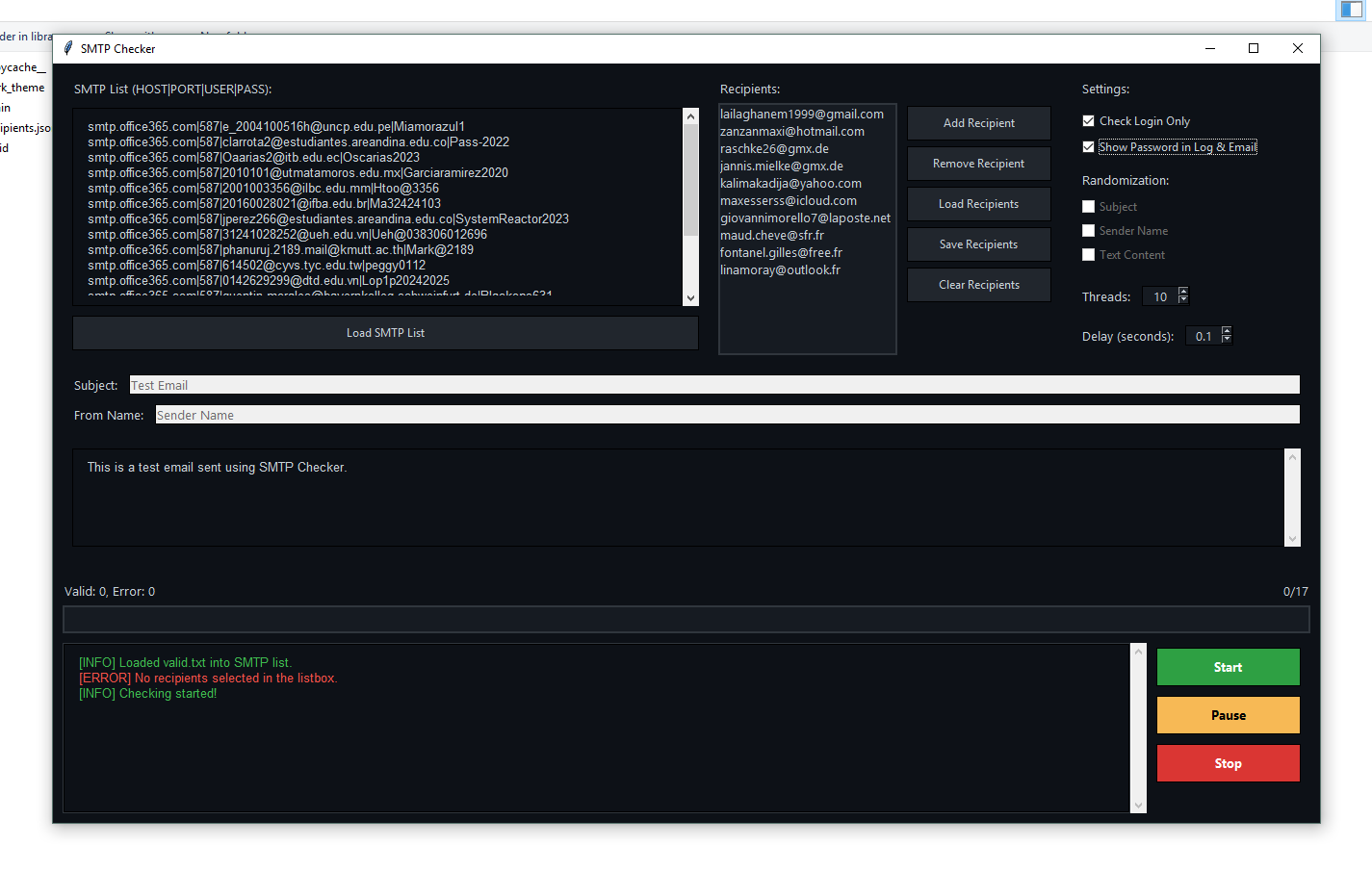
Interface utilisateur Windows simple pour valider les identifiants SMTP et, éventuellement, envoyer un e-mail de test aux destinataires sélectionnés. Vérification multithread, affichage de la progression et enregistrement automatique des résultats valides.
### Fonctionnalités – **Saisie de la liste SMTP** : `HOST|PORT|USER|PASS` par ligne – **Gestion des destinataires** : ajouter, supprimer, charger, enregistrer, sélectionner plusieurs destinataires – **Mode connexion uniquement** : vérifier les identifiants sans envoyer d’e-mail – **Envoi d’e-mails** : objet/expéditeur/contenu avec randomisation optionnelle – **Contrôles des threads et des délais** – **Journaux et progression en temps réel** – **Fichiers de sortie** : `valid.txt` et `valid_logins.txt` – **Surveillance Internet** : pause automatique en mode hors connexion, reprise automatique au retour ### Configuration requise – **Système d’exploitation** : Windows 10/11 – **Python** : 3.8 ou version ultérieure (tkinter est inclus dans le programme d’installation standard de Windows) ### Prise en main 1. **Téléchargez/clonez** ce dossier sur votre ordinateur. 2. (Facultatif) Créez un environnement virtuel : “`bash python -m venv .venv .venv\\Scripts\\activate “` 3. **Exécutez l'application** : “`bash python main.py “` ### Utilisation de l'application 1. **Liste SMTP** – Collez ou cliquez sur « Charger la liste SMTP » pour importer un fichier `.txt`. – Format attendu par ligne : `HOST|PORT|USER|PASS` – Exemple : “` smtp.gmail.com|587|[email protected]|app-password smtp.mail.yahoo.com|587|[email protected]|password123
2. **Recipients** – Add recipients manually, or use “Load Recipients” to import a JSON list. – Select one or more recipients in the list before starting (unless using Login Only). 3. **Settings** – **Check Login Only**: only authenticate; no email will be sent. – **Show Password in Log & Email**: toggles whether the raw SMTP string is included in the message content. – **Randomization**: random subject, sender name, or content for each send. – **Threads**: number of concurrent SMTP checks. – **Delay**: pause between checks (seconds). 4. **Compose** – Set Subject, From Name, and Email Content (HTML supported). 5. **Run** – Click **Start** to begin, **Pause/Resume**, or **Stop** at any time. – Progress and results appear in the log area. ### Output Files – **valid.txt**: credentials that successfully logged in and sent an email. – **valid_logins.txt**: credentials that successfully logged in when “Check Login Only” is enabled. – **recipients.json**: automatically maintained when you add/remove recipients in the UI. ### Important Notes About SMTP – The checker uses `STARTTLS` (TLS upgrade) after EHLO. Ensure your selected port supports it (commonly 587). – SMTPS on port 465 (implicit SSL) is not supported by this script. ### Troubleshooting – **“No recipients selected”**: Select at least one recipient in the list, or enable “Check Login Only”. – **“Invalid SMTP format”**: Ensure each line is exactly `HOST|PORT|USER|PASS` with no spaces. – **Nothing happens / no progress**: – Check your internet connection; the app pauses automatically when offline. – Try reducing Threads and increasing Delay to avoid rate limits. – Some providers throttle or block test messages—check provider policy. – **Auth succeeds but send fails**: The account may be allowed to login but blocked from sending; review provider SMTP policies and app passwords. ### License This project is provided as-is, without warranty. Use responsibly and in accordance with your email provider’s terms and applicable laws.
Télécharger 1 Télécharger 2 Télécharger 3